“Let’s be clear: the work of science has nothing whatever to do with consensus. Consensus is the business of politics. Science, on the contrary, requires only one investigator who happens to be right, which means that he or she has results that are verifiable by reference to the real world. In science consensus is irrelevant. What is relevant is reproducible results.” -- Michael Crichton
Overview
NumPy is a first-rate library for numerical programming
Widely used in academia, finance and industry.
Mature, fast, stable and under continuous development.
We have already seen some code involving NumPy in the preceding lectures.
In this lecture, we will start a more systematic discussion of
NumPy arrays and
the fundamental array processing operations provided by NumPy.
(For an alternative reference, see the official NumPy documentation.)
We will use the following imports.
import numpy as np
import random
import quantecon as qe
import matplotlib.pyplot as plt
from mpl_toolkits.mplot3d.axes3d import Axes3D
from matplotlib import cm
NumPy Arrays
The essential problem that NumPy solves is fast array processing.
The most important structure that NumPy defines is an array data type, formally called a numpy.ndarray.
NumPy arrays power a very large proportion of the scientific Python ecosystem.
Basics
To create a NumPy array containing only zeros we use np.zeros
a = np.zeros(3)
atype(a)NumPy arrays are somewhat like native Python lists, except that
Data must be homogeneous (all elements of the same type).
These types must be one of the data types (
dtypes) provided by NumPy.
The most important of these dtypes are:
float64: 64 bit floating-point number
int64: 64 bit integer
bool: 8 bit True or False
There are also dtypes to represent complex numbers, unsigned integers, etc.
On modern machines, the default dtype for arrays is float64
a = np.zeros(3)
type(a[0])
If we want to use integers we can specify as follows:
a = np.zeros(3, dtype=int)
type(a[0])
Shape and Dimension
Consider the following assignment
z = np.zeros(10)Here z is a flat array --- neither row nor column vector.
z.shapeHere the shape tuple has only one element, which is the length of the array (tuples with one element end with a comma).
To give it an additional dimension, we can change the shape attribute
z.shape = (10, 1)   # Convert flat array to column vector (two-dimensional)
z
z = np.zeros(4) # Flat array
z.shape = (2, 2) # Two-dimensional array
zIn the last case, to make the 2x2 array, we could also pass a tuple to the zeros() function, as
in z = np.zeros((2, 2)).
Creating Arrays
As we’ve seen, the np.zeros function creates an array of zeros.
You can probably guess what np.ones creates.
Related is np.empty, which creates arrays in memory that can later be populated with data
z = np.empty(3)
z
The numbers you see here are garbage values.
(Python allocates 3 contiguous 64 bit pieces of memory, and the existing contents of those memory slots are interpreted as float64 values)
To set up a grid of evenly spaced numbers use np.linspace
z = np.linspace(2, 4, 5) # From 2 to 4, with 5 elementsTo create an identity matrix use either np.identity or np.eye
z = np.identity(2)
z
In addition, NumPy arrays can be created from Python lists, tuples, etc. using np.array
z = np.array([10, 20])                 # ndarray from Python list
ztype(z)z = np.array((10, 20), dtype=float) # Here 'float' is equivalent to 'np.float64'
zz = np.array([[1, 2], [3, 4]]) # 2D array from a list of lists
zSee also np.asarray, which performs a similar function, but does not make
a distinct copy of data already in a NumPy array.
To read in the array data from a text file containing numeric data use np.loadtxt ---see the documentation for details.
Array Indexing
For a flat array, indexing is the same as Python sequences:
z = np.linspace(1, 2, 5)
zz[0]z[0:2] # Two elements, starting at element 0z[-1]For 2D arrays the index syntax is as follows:
z = np.array([[1, 2], [3, 4]])
z
z[0, 0]z[0, 1]And so on.
Columns and rows can be extracted as follows
z[0, :]z[:, 1]NumPy arrays of integers can also be used to extract elements
z = np.linspace(2, 4, 5)
z
indices = np.array((0, 2, 3))
z[indices]Finally, an array of dtype bool can be used to extract elements
zd = np.array([0, 1, 1, 0, 0], dtype=bool)
dz[d]We’ll see why this is useful below.
An aside: all elements of an array can be set equal to one number using slice notation
z = np.empty(3)
z
z[:] = 42
zArray Methods
Arrays have useful methods, all of which are carefully optimized
a = np.array((4, 3, 2, 1))
a
a.sort() # Sorts a in place
aa.sum() # Suma.mean() # Meana.max() # Maxa.argmax() # Returns the index of the maximal elementa.cumsum() # Cumulative sum of the elements of aa.cumprod() # Cumulative product of the elements of aa.var() # Variancea.std() # Standard deviationa.shape = (2, 2)
a.T # Equivalent to a.transpose()Another method worth knowing is searchsorted().
If z is a nondecreasing array, then z.searchsorted(a) returns the index of
the first element of z that is >= a
z = np.linspace(2, 4, 5)
zz.searchsorted(2.2)Arithmetic Operations
The operators +, -, *, / and ** all act elementwise on arrays
a = np.array([1, 2, 3, 4])
b = np.array([5, 6, 7, 8])
a + b
a * bWe can add a scalar to each element as follows
a + 10Scalar multiplication is similar
a * 10The two-dimensional arrays follow the same general rules
A = np.ones((2, 2))
B = np.ones((2, 2))
A + B
A + 10A * BIn particular, A * B is not the matrix product, it is an element-wise product.
Matrix Multiplication
We use the @ symbol for matrix multiplication, as follows:
A = np.ones((2, 2))
B = np.ones((2, 2))
A @ B
The syntax works with flat arrays --- NumPy makes an educated guess of what you want:
A @ (0, 1)Since we are post-multiplying, the tuple is treated as a column vector.
Broadcasting
(This section extends an excellent discussion of broadcasting provided by Jake VanderPlas.)
In element-wise operations, arrays may not have the same shape.
When this happens, NumPy will automatically expand arrays to the same shape whenever possible.
This useful (but sometimes confusing) feature in NumPy is called broadcasting.
The value of broadcasting is that
forloops can be avoided, which helps numerical code run fast andbroadcasting can allow us to implement operations on arrays without actually creating some dimensions of these arrays in memory, which can be important when arrays are large.
For example, suppose a is a array (a -> (3, 3)), while b is a flat array with three elements (b -> (3,)).
When adding them together, NumPy will automatically expand b -> (3,) to b -> (3, 3).
The element-wise addition will result in a array
a = np.array(
        [[1, 2, 3],
         [4, 5, 6],
         [7, 8, 9]])
b = np.array([3, 6, 9])

a + b
Here is a visual representation of this broadcasting operation:
Source
# Adapted and modified based on the code in the book written by Jake VanderPlas (see https://jakevdp.github.io/PythonDataScienceHandbook/06.00-figure-code.html#Broadcasting)
# Originally from astroML: see https://www.astroml.org/book_figures/appendix/fig_broadcast_visual.html


def draw_cube(ax, xy, size, depth=0.4,
              edges=None, label=None, label_kwargs=None, **kwargs):
    """draw and label a cube.  edges is a list of numbers between
    1 and 12, specifying which of the 12 cube edges to draw"""
    if edges is None:
        edges = range(1, 13)

    x, y = xy

    if 1 in edges:
        ax.plot([x, x + size],
                [y + size, y + size], **kwargs)
    if 2 in edges:
        ax.plot([x + size, x + size],
                [y, y + size], **kwargs)
    if 3 in edges:
        ax.plot([x, x + size],
                [y, y], **kwargs)
    if 4 in edges:
        ax.plot([x, x],
                [y, y + size], **kwargs)

    if 5 in edges:
        ax.plot([x, x + depth],
                [y + size, y + depth + size], **kwargs)
    if 6 in edges:
        ax.plot([x + size, x + size + depth],
                [y + size, y + depth + size], **kwargs)
    if 7 in edges:
        ax.plot([x + size, x + size + depth],
                [y, y + depth], **kwargs)
    if 8 in edges:
        ax.plot([x, x + depth],
                [y, y + depth], **kwargs)

    if 9 in edges:
        ax.plot([x + depth, x + depth + size],
                [y + depth + size, y + depth + size], **kwargs)
    if 10 in edges:
        ax.plot([x + depth + size, x + depth + size],
                [y + depth, y + depth + size], **kwargs)
    if 11 in edges:
        ax.plot([x + depth, x + depth + size],
                [y + depth, y + depth], **kwargs)
    if 12 in edges:
        ax.plot([x + depth, x + depth],
                [y + depth, y + depth + size], **kwargs)

    if label:
        if label_kwargs is None:
            label_kwargs = {}
        ax.text(x + 0.5 * size, y + 0.5 * size, label,
                ha='center', va='center', **label_kwargs)

solid = dict(c='black', ls='-', lw=1,
             label_kwargs=dict(color='k'))
dotted = dict(c='black', ls='-', lw=0.5, alpha=0.5,
              label_kwargs=dict(color='gray'))
depth = 0.3

# Draw a figure and axis with no boundary
fig = plt.figure(figsize=(5, 1), facecolor='w')
ax = plt.axes([0, 0, 1, 1], xticks=[], yticks=[], frameon=False)

# first block
draw_cube(ax, (1, 7.5), 1, depth, [1, 2, 3, 4, 5, 6, 9], '1', **solid)
draw_cube(ax, (2, 7.5), 1, depth, [1, 2, 3, 6, 9], '2', **solid)
draw_cube(ax, (3, 7.5), 1, depth, [1, 2, 3, 6, 7, 9, 10], '3', **solid)

draw_cube(ax, (1, 6.5), 1, depth, [2, 3, 4], '4', **solid)
draw_cube(ax, (2, 6.5), 1, depth, [2, 3], '5', **solid)
draw_cube(ax, (3, 6.5), 1, depth, [2, 3, 7, 10], '6', **solid)

draw_cube(ax, (1, 5.5), 1, depth, [2, 3, 4], '7', **solid)
draw_cube(ax, (2, 5.5), 1, depth, [2, 3], '8', **solid)
draw_cube(ax, (3, 5.5), 1, depth, [2, 3, 7, 10], '9', **solid)

# second block
draw_cube(ax, (6, 7.5), 1, depth, [1, 2, 3, 4, 5, 6, 9], '3', **solid)
draw_cube(ax, (7, 7.5), 1, depth, [1, 2, 3, 6, 9], '6', **solid)
draw_cube(ax, (8, 7.5), 1, depth, [1, 2, 3, 6, 7, 9, 10], '9', **solid)

draw_cube(ax, (6, 6.5), 1, depth, range(2, 13), '3', **dotted)
draw_cube(ax, (7, 6.5), 1, depth, [2, 3, 6, 7, 9, 10, 11], '6', **dotted)
draw_cube(ax, (8, 6.5), 1, depth, [2, 3, 6, 7, 9, 10, 11], '9', **dotted)

draw_cube(ax, (6, 5.5), 1, depth, [2, 3, 4, 7, 8, 10, 11, 12], '3', **dotted)
draw_cube(ax, (7, 5.5), 1, depth, [2, 3, 7, 10, 11], '6', **dotted)
draw_cube(ax, (8, 5.5), 1, depth, [2, 3, 7, 10, 11], '9', **dotted)

# third block
draw_cube(ax, (12, 7.5), 1, depth, [1, 2, 3, 4, 5, 6, 9], '4', **solid)
draw_cube(ax, (13, 7.5), 1, depth, [1, 2, 3, 6, 9], '8', **solid)
draw_cube(ax, (14, 7.5), 1, depth, [1, 2, 3, 6, 7, 9, 10], '12', **solid)

draw_cube(ax, (12, 6.5), 1, depth, [2, 3, 4], '7', **solid)
draw_cube(ax, (13, 6.5), 1, depth, [2, 3], '11', **solid)
draw_cube(ax, (14, 6.5), 1, depth, [2, 3, 7, 10], '15', **solid)

draw_cube(ax, (12, 5.5), 1, depth, [2, 3, 4], '10', **solid)
draw_cube(ax, (13, 5.5), 1, depth, [2, 3], '14', **solid)
draw_cube(ax, (14, 5.5), 1, depth, [2, 3, 7, 10], '18', **solid)

ax.text(5, 7.0, '+', size=12, ha='center', va='center')
ax.text(10.5, 7.0, '=', size=12, ha='center', va='center');
How about b -> (3, 1)?
In this case, NumPy will automatically expand b -> (3, 1) to b -> (3, 3).
Element-wise addition will then result in a matrix
b.shape = (3, 1)

a + b
Here is a visual representation of this broadcasting operation:
Source
fig = plt.figure(figsize=(5, 1), facecolor='w')
ax = plt.axes([0, 0, 1, 1], xticks=[], yticks=[], frameon=False)

# first block
draw_cube(ax, (1, 7.5), 1, depth, [1, 2, 3, 4, 5, 6, 9], '1', **solid)
draw_cube(ax, (2, 7.5), 1, depth, [1, 2, 3, 6, 9], '2', **solid)
draw_cube(ax, (3, 7.5), 1, depth, [1, 2, 3, 6, 7, 9, 10], '3', **solid)

draw_cube(ax, (1, 6.5), 1, depth, [2, 3, 4], '4', **solid)
draw_cube(ax, (2, 6.5), 1, depth, [2, 3], '5', **solid)
draw_cube(ax, (3, 6.5), 1, depth, [2, 3, 7, 10], '6', **solid)

draw_cube(ax, (1, 5.5), 1, depth, [2, 3, 4], '7', **solid)
draw_cube(ax, (2, 5.5), 1, depth, [2, 3], '8', **solid)
draw_cube(ax, (3, 5.5), 1, depth, [2, 3, 7, 10], '9', **solid)

# second block
draw_cube(ax, (6, 7.5), 1, depth, [1, 2, 3, 4, 5, 6, 7, 9, 10], '3', **solid)
draw_cube(ax, (7, 7.5), 1, depth, [1, 2, 3, 6, 7, 9, 10], '3', **dotted)
draw_cube(ax, (8, 7.5), 1, depth, [1, 2, 3, 6, 7, 9, 10], '3', **dotted)

draw_cube(ax, (6, 6.5), 1, depth, [2, 3, 4, 7, 10], '6', **solid)
draw_cube(ax, (7, 6.5), 1, depth, [2, 3, 6, 7, 9, 10, 11], '6', **dotted)
draw_cube(ax, (8, 6.5), 1, depth, [2, 3, 6, 7, 9, 10, 11], '6', **dotted)

draw_cube(ax, (6, 5.5), 1, depth, [2, 3, 4, 7, 10], '9', **solid)
draw_cube(ax, (7, 5.5), 1, depth, [2, 3, 7, 10, 11], '9', **dotted)
draw_cube(ax, (8, 5.5), 1, depth, [2, 3, 7, 10, 11], '9', **dotted)

# third block
draw_cube(ax, (12, 7.5), 1, depth, [1, 2, 3, 4, 5, 6, 9], '4', **solid)
draw_cube(ax, (13, 7.5), 1, depth, [1, 2, 3, 6, 9], '5', **solid)
draw_cube(ax, (14, 7.5), 1, depth, [1, 2, 3, 6, 7, 9, 10], '6', **solid)

draw_cube(ax, (12, 6.5), 1, depth, [2, 3, 4], '10', **solid)
draw_cube(ax, (13, 6.5), 1, depth, [2, 3], '11', **solid)
draw_cube(ax, (14, 6.5), 1, depth, [2, 3, 7, 10], '12', **solid)

draw_cube(ax, (12, 5.5), 1, depth, [2, 3, 4], '16', **solid)
draw_cube(ax, (13, 5.5), 1, depth, [2, 3], '17', **solid)
draw_cube(ax, (14, 5.5), 1, depth, [2, 3, 7, 10], '18', **solid)

ax.text(5, 7.0, '+', size=12, ha='center', va='center')
ax.text(10.5, 7.0, '=', size=12, ha='center', va='center');
In some cases, both operands will be expanded.
When we have a -> (3,) and b -> (3, 1), a will be expanded to a -> (3, 3), and b will be expanded to b -> (3, 3).
In this case, element-wise addition will result in a matrix
a = np.array([3, 6, 9])
b = np.array([2, 3, 4])
b.shape = (3, 1)

a + b
Here is a visual representation of this broadcasting operation:
Source
# Draw a figure and axis with no boundary
fig = plt.figure(figsize=(5, 1), facecolor='w')
ax = plt.axes([0, 0, 1, 1], xticks=[], yticks=[], frameon=False)

# first block
draw_cube(ax, (1, 7.5), 1, depth, [1, 2, 3, 4, 5, 6, 9], '3', **solid)
draw_cube(ax, (2, 7.5), 1, depth, [1, 2, 3, 6, 9], '6', **solid)
draw_cube(ax, (3, 7.5), 1, depth, [1, 2, 3, 6, 7, 9, 10], '9', **solid)

draw_cube(ax, (1, 6.5), 1, depth, range(2, 13), '3', **dotted)
draw_cube(ax, (2, 6.5), 1, depth, [2, 3, 6, 7, 9, 10, 11], '6', **dotted)
draw_cube(ax, (3, 6.5), 1, depth, [2, 3, 6, 7, 9, 10, 11], '9', **dotted)

draw_cube(ax, (1, 5.5), 1, depth, [2, 3, 4, 7, 8, 10, 11, 12], '3', **dotted)
draw_cube(ax, (2, 5.5), 1, depth, [2, 3, 7, 10, 11], '6', **dotted)
draw_cube(ax, (3, 5.5), 1, depth, [2, 3, 7, 10, 11], '9', **dotted)

# second block
draw_cube(ax, (6, 7.5), 1, depth, [1, 2, 3, 4, 5, 6, 7, 9, 10], '2', **solid)
draw_cube(ax, (7, 7.5), 1, depth, [1, 2, 3, 6, 7, 9, 10], '2', **dotted)
draw_cube(ax, (8, 7.5), 1, depth, [1, 2, 3, 6, 7, 9, 10], '2', **dotted)

draw_cube(ax, (6, 6.5), 1, depth, [2, 3, 4, 7, 10], '3', **solid)
draw_cube(ax, (7, 6.5), 1, depth, [2, 3, 6, 7, 9, 10, 11], '3', **dotted)
draw_cube(ax, (8, 6.5), 1, depth, [2, 3, 6, 7, 9, 10, 11], '3', **dotted)

draw_cube(ax, (6, 5.5), 1, depth, [2, 3, 4, 7, 10], '4', **solid)
draw_cube(ax, (7, 5.5), 1, depth, [2, 3, 7, 10, 11], '4', **dotted)
draw_cube(ax, (8, 5.5), 1, depth, [2, 3, 7, 10, 11], '4', **dotted)

# third block
draw_cube(ax, (12, 7.5), 1, depth, [1, 2, 3, 4, 5, 6, 9], '5', **solid)
draw_cube(ax, (13, 7.5), 1, depth, [1, 2, 3, 6, 9], '8', **solid)
draw_cube(ax, (14, 7.5), 1, depth, [1, 2, 3, 6, 7, 9, 10], '11', **solid)

draw_cube(ax, (12, 6.5), 1, depth, [2, 3, 4], '6', **solid)
draw_cube(ax, (13, 6.5), 1, depth, [2, 3], '9', **solid)
draw_cube(ax, (14, 6.5), 1, depth, [2, 3, 7, 10], '12', **solid)

draw_cube(ax, (12, 5.5), 1, depth, [2, 3, 4], '7', **solid)
draw_cube(ax, (13, 5.5), 1, depth, [2, 3], '10', **solid)
draw_cube(ax, (14, 5.5), 1, depth, [2, 3, 7, 10], '13', **solid)

ax.text(5, 7.0, '+', size=12, ha='center', va='center')
ax.text(10.5, 7.0, '=', size=12, ha='center', va='center');
While broadcasting is very useful, it can sometimes seem confusing.
For example, let’s try adding a -> (3, 2) and b -> (3,).
a = np.array(
      [[1, 2],
       [4, 5],
       [7, 8]])
b = np.array([3, 6, 9])

a + b
The ValueError tells us that operands could not be broadcast together.
Here is a visual representation to show why this broadcasting cannot be executed:
Source
# Draw a figure and axis with no boundary
fig = plt.figure(figsize=(3, 1.3), facecolor='w')
ax = plt.axes([0, 0, 1, 1], xticks=[], yticks=[], frameon=False)

# first block
draw_cube(ax, (1, 7.5), 1, depth, [1, 2, 3, 4, 5, 6, 9], '1', **solid)
draw_cube(ax, (2, 7.5), 1, depth, [1, 2, 3, 6, 7, 9, 10], '2', **solid)

draw_cube(ax, (1, 6.5), 1, depth, [2, 3, 4], '4', **solid)
draw_cube(ax, (2, 6.5), 1, depth, [2, 3, 7, 10], '5', **solid)

draw_cube(ax, (1, 5.5), 1, depth, [2, 3, 4], '7', **solid)
draw_cube(ax, (2, 5.5), 1, depth, [2, 3, 7, 10], '8', **solid)

# second block
draw_cube(ax, (6, 7.5), 1, depth, [1, 2, 3, 4, 5, 6, 9], '3', **solid)
draw_cube(ax, (7, 7.5), 1, depth, [1, 2, 3, 6, 9], '6', **solid)
draw_cube(ax, (8, 7.5), 1, depth, [1, 2, 3, 6, 7, 9, 10], '9', **solid)

draw_cube(ax, (6, 6.5), 1, depth, range(2, 13), '3', **dotted)
draw_cube(ax, (7, 6.5), 1, depth, [2, 3, 6, 7, 9, 10, 11], '6', **dotted)
draw_cube(ax, (8, 6.5), 1, depth, [2, 3, 6, 7, 9, 10, 11], '9', **dotted)

draw_cube(ax, (6, 5.5), 1, depth, [2, 3, 4, 7, 8, 10, 11, 12], '3', **dotted)
draw_cube(ax, (7, 5.5), 1, depth, [2, 3, 7, 10, 11], '6', **dotted)
draw_cube(ax, (8, 5.5), 1, depth, [2, 3, 7, 10, 11], '9', **dotted)


ax.text(4.5, 7.0, '+', size=12, ha='center', va='center')
ax.text(10, 7.0, '=', size=12, ha='center', va='center')
ax.text(11, 7.0, '?', size=16, ha='center', va='center');
We can see that NumPy cannot expand the arrays to the same size.
It is because, when b is expanded from b -> (3,) to b -> (3, 3), NumPy cannot match b with a -> (3, 2).
Things get even trickier when we move to higher dimensions.
To help us, we can use the following list of rules:
Step 1: When the dimensions of two arrays do not match, NumPy will expand the one with fewer dimensions by adding dimension(s) on the left of the existing dimensions.
For example, if
a -> (3, 3)andb -> (3,), then broadcasting will add a dimension to the left so thatb -> (1, 3);If
a -> (2, 2, 2)andb -> (2, 2), then broadcasting will add a dimension to the left so thatb -> (1, 2, 2);If
a -> (3, 2, 2)andb -> (2,), then broadcasting will add two dimensions to the left so thatb -> (1, 1, 2)(you can also see this process as going through Step 1 twice).
Step 2: When the two arrays have the same dimension but different shapes, NumPy will try to expand dimensions where the shape index is 1.
For example, if
a -> (1, 3)andb -> (3, 1), then broadcasting will expand dimensions with shape 1 in bothaandbso thata -> (3, 3)andb -> (3, 3);If
a -> (2, 2, 2)andb -> (1, 2, 2), then broadcasting will expand the first dimension ofbso thatb -> (2, 2, 2);If
a -> (3, 2, 2)andb -> (1, 1, 2), then broadcasting will expandbon all dimensions with shape 1 so thatb -> (3, 2, 2).
Step 3: After Step 1 and 2, if the two arrays still do not match, a
ValueErrorwill be raised. For example, supposea -> (2, 2, 3)andb -> (2, 2)By Step 1,
bwill be expanded tob -> (1, 2, 2);By Step 2,
bwill be expanded tob -> (2, 2, 2);We can see that they do not match each other after the first two steps. Thus, a
ValueErrorwill be raised
Mutability and Copying Arrays
NumPy arrays are mutable data types, like Python lists.
In other words, their contents can be altered (mutated) in memory after initialization.
This is convenient but, when combined with Python’s naming and reference model, can lead to mistakes by NumPy beginners.
In this section we review some key issues.
Mutability
We already saw examples of multability above.
Here’s another example of mutation of a NumPy array
a = np.array([42, 44])
a
a[-1] = 0 # Change last element to 0
aMutability leads to the following behavior (which can be shocking to MATLAB programmers...)
a = np.random.randn(3)
a
b = a
b[0] = 0.0
aWhat’s happened is that we have changed a by changing b.
The name b is bound to a and becomes just another reference to the
array (the Python assignment model is described in more detail later in the course).
Hence, it has equal rights to make changes to that array.
This is in fact the most sensible default behavior!
It means that we pass around only pointers to data, rather than making copies.
Making copies is expensive in terms of both speed and memory.
Making Copies
It is of course possible to make b an independent copy of a when required.
This can be done using np.copy
a = np.random.randn(3)
a
b = np.copy(a)
bNow b is an independent copy (called a deep copy)
b[:] = 1
baNote that the change to b has not affected a.
Additional Features
Let’s look at some other useful features of NumPy.
Universal Functions
NumPy provides versions of the standard functions log, exp, sin, etc. that act element-wise on arrays
z = np.array([1, 2, 3])
np.sin(z)
This eliminates the need for explicit element-by-element loops such as
n = len(z)
y = np.empty(n)
for i in range(n):
    y[i] = np.sin(z[i])
Because they act element-wise on arrays, these functions are sometimes called vectorized functions.
In NumPy-speak, they are also called ufuncs, or universal functions.
As we saw above, the usual arithmetic operations (+, *, etc.) also
work element-wise, and combining these with the ufuncs gives a very large set of fast element-wise functions.
z(1 / np.sqrt(2 * np.pi)) * np.exp(- 0.5 * z**2)Not all user-defined functions will act element-wise.
For example, passing the function f defined below a NumPy array causes a ValueError
def f(x):
    return 1 if x > 0 else 0
The NumPy function np.where provides a vectorized alternative:
x = np.random.randn(4)
x
np.where(x > 0, 1, 0) # Insert 1 if x > 0 true, otherwise 0You can also use np.vectorize to vectorize a given function
f = np.vectorize(f)
f(x)                # Passing the same vector x as in the previous example
However, this approach doesn’t always obtain the same speed as a more carefully crafted vectorized function.
(Later we’ll see that JAX has a powerful version of np.vectorize that can and usually does generate highly efficient code.)
Comparisons
As a rule, comparisons on arrays are done element-wise
z = np.array([2, 3])
y = np.array([2, 3])
z == y
y[0] = 5
z == yz != yThe situation is similar for >, <, >= and <=.
We can also do comparisons against scalars
z = np.linspace(0, 10, 5)
z
z > 3This is particularly useful for conditional extraction
b = z > 3
bz[b]Of course we can---and frequently do---perform this in one step
z[z > 3]Sub-packages
NumPy provides some additional functionality related to scientific programming through its sub-packages.
We’ve already seen how we can generate random variables using np.random
z = np.random.randn(10000)  # Generate standard normals
y = np.random.binomial(10, 0.5, size=1000)    # 1,000 draws from Bin(10, 0.5)
y.mean()
Another commonly used subpackage is np.linalg
A = np.array([[1, 2], [3, 4]])

np.linalg.det(A)           # Compute the determinant
np.linalg.inv(A) # Compute the inverseMuch of this functionality is also available in SciPy, a collection of modules that are built on top of NumPy.
We’ll cover the SciPy versions in more detail soon.
For a comprehensive list of what’s available in NumPy see this documentation.
Implicit Multithreading
Previously we discussed the concept of parallelization via multithreading.
NumPy tries to implement multithreading in much of its compiled code.
Let’s look at an example to see this in action.
The next piece of code computes the eigenvalues of a large number of randomly generated matrices.
It takes a few seconds to run.
n = 20
m = 1000
for i in range(n):
    X = np.random.randn(m, m)
    λ = np.linalg.eigvals(X)
Now, let’s look at the output of the htop system monitor on our machine while this code is running:
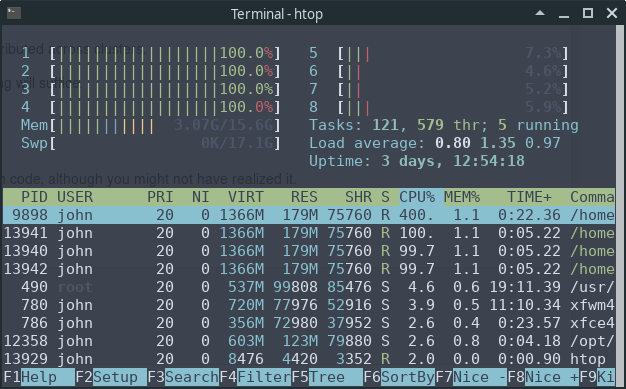
We can see that 4 of the 8 CPUs are running at full speed.
This is because NumPy’s eigvals routine neatly splits up the tasks and
distributes them to different threads.
Exercises
Solution to Exercise 1
This code does the job
def p(x, coef):
    X = np.ones_like(coef)
    X[1:] = x
    y = np.cumprod(X)   # y = [1, x, x**2,...]
    return coef @ y
Let’s test it
x = 2
coef = np.linspace(2, 4, 3)
print(coef)
print(p(x, coef))
# For comparison
q = np.poly1d(np.flip(coef))
print(q(x))Solution to Exercise 2
Here’s our first pass at a solution:
from numpy import cumsum
from numpy.random import uniform

class DiscreteRV:
    """
    Generates an array of draws from a discrete random variable with vector of
    probabilities given by q.
    """

    def __init__(self, q):
        """
        The argument q is a NumPy array, or array like, nonnegative and sums
        to 1
        """
        self.q = q
        self.Q = cumsum(q)

    def draw(self, k=1):
        """
        Returns k draws from q. For each such draw, the value i is returned
        with probability q[i].
        """
        return self.Q.searchsorted(uniform(0, 1, size=k))
The logic is not obvious, but if you take your time and read it slowly, you will understand.
There is a problem here, however.
Suppose that q is altered after an instance of discreteRV is
created, for example by
q = (0.1, 0.9)
d = DiscreteRV(q)
d.q = (0.5, 0.5)
The problem is that Q does not change accordingly, and Q is the
data used in the draw method.
To deal with this, one option is to compute Q every time the draw
method is called.
But this is inefficient relative to computing Q once-off.
A better option is to use descriptors.
A solution from the quantecon library using descriptors that behaves as we desire can be found here.
Solution to Exercise 3
An example solution is given below.
In essence, we’ve just taken this code from QuantEcon and added in a plot method
"""
Modifies ecdf.py from QuantEcon to add in a plot method

"""

class ECDF:
    """
    One-dimensional empirical distribution function given a vector of
    observations.

    Parameters
    ----------
    observations : array_like
        An array of observations

    Attributes
    ----------
    observations : array_like
        An array of observations

    """

    def __init__(self, observations):
        self.observations = np.asarray(observations)

    def __call__(self, x):
        """
        Evaluates the ecdf at x

        Parameters
        ----------
        x : scalar(float)
            The x at which the ecdf is evaluated

        Returns
        -------
        scalar(float)
            Fraction of the sample less than x

        """
        return np.mean(self.observations <= x)

    def plot(self, ax, a=None, b=None):
        """
        Plot the ecdf on the interval [a, b].

        Parameters
        ----------
        a : scalar(float), optional(default=None)
            Lower endpoint of the plot interval
        b : scalar(float), optional(default=None)
            Upper endpoint of the plot interval

        """

        # === choose reasonable interval if [a, b] not specified === #
        if a is None:
            a = self.observations.min() - self.observations.std()
        if b is None:
            b = self.observations.max() + self.observations.std()

        # === generate plot === #
        x_vals = np.linspace(a, b, num=100)
        f = np.vectorize(self.__call__)
        ax.plot(x_vals, f(x_vals))
        plt.show()
Here’s an example of usage
fig, ax = plt.subplots()
X = np.random.randn(1000)
F = ECDF(X)
F.plot(ax)Solution to Exercise 4
Part 1 Solution
np.random.seed(123)
x = np.random.randn(4, 4)
y = np.random.randn(4)

C = np.empty_like(x)
n = len(x)
for i in range(n):
    for j in range(n):
        C[i, j] = x[i, j] / y[j]
Compare the results to check your answer
print(C)Output
You can also use array_equal() to check your answer
print(np.array_equal(A, C))Part 2 Solution
np.random.seed(123)
x = np.random.randn(1000, 100, 100)
y = np.random.randn(100)

with qe.Timer("For loop operation"):
    D = np.empty_like(x)
    d1, d2, d3 = x.shape
    for i in range(d1):
        for j in range(d2):
            for k in range(d3):
                D[i, j, k] = x[i, j, k] / y[k]
Note that the for loop takes much longer than the broadcasting operation.
Compare the results to check your answer
print(D)Output
print(np.array_equal(B, D))