Learning Objectives
Upon completion of this chapter, readers will demonstrate proficiency in categorical variable analysis using Python by:
7.1 Creating dummy variables from categorical data using pandas get_dummies and patsy C() categorical coding functions.
7.2 Estimating regression models with multiple category indicators and interpreting coefficients as group mean differences using statsmodels.
7.3 Implementing interaction terms between dummy and continuous variables using patsy formula syntax with colon operators.
7.4 Conducting Chow tests for structural breaks through F-tests comparing restricted and unrestricted models with statsmodels.
7.5 Estimating linear probability models (LPM) and computing heteroskedasticity-robust standard errors appropriate for binary outcomes.
7.6 Implementing difference-in-differences estimators for program evaluation using interaction terms between time and treatment dummies.
7.7 Visualizing group differences and interactions through categorical plots using seaborn catplot and interaction_plot functions.
7.8 Conducting post-estimation hypothesis tests for coefficient equality across groups using wald_test methods.
Incorporating categorical variables into regression models enables researchers to analyze the impact of non-numeric factors such as gender, marital status, occupation, or geographic region on economic outcomes. This chapter develops the theory and practice of using dummy variables (indicator variables) to represent qualitative factors numerically, allowing their inclusion alongside quantitative regressors in the OLS framework.
The presentation builds systematically from basic dummy variable techniques to advanced applications. We begin with binary dummy variables and their interpretation as intercept shifts (Section 7.1), extend to categorical variables with multiple categories (Section 7.2), examine interaction terms between qualitative and quantitative variables allowing for slope differences (Section 7.3), address the linear probability model for binary dependent variables (Section 7.4-7.6), develop difference-in-differences methods for program evaluation (Section 7.7), and conclude with the Chow test for structural breaks (Section 7.8). Throughout, we implement these methods using Python’s statsmodels library with real datasets from applied econometric research.
import matplotlib.pyplot as plt
import numpy as np  # noqa: F401
import pandas as pd
import statsmodels.api as sm
import statsmodels.formula.api as smf
import wooldridge as wool
from scipy import stats

plt.style.use("theme.mplstyle")
7.1 Linear Regression with Dummy Variables as Regressors
Dummy variables (also called indicator variables or binary variables) take on the value 1 or 0 to indicate the presence or absence of a specific attribute or category. In regression analysis, they are used to include qualitative information in a quantitative framework.
Key Concepts:
Reference Category (Base Category): When including a dummy variable, one category is always omitted and serves as the reference category or base category. All coefficient interpretations are relative to this reference group.
Interpretation: The coefficient on a dummy variable represents the difference in the expected value of the dependent variable between the category indicated by the dummy (when dummy=1) and the reference category (when dummy=0), holding all other variables constant.
Dummy Variable Trap: For a categorical variable with categories, we include only dummy variables in the regression. Including all dummies would cause perfect multicollinearity (violating MLR.3) because the dummies would sum to the constant term.
Example: If we have a gender variable with categories “male” and “female”, we create one dummy variable:
female = 1if female,female = 0if maleReference category: male (when
female = 0)Coefficient interpretation: represents the expected difference in between females and males, holding other variables constant. If in a wage equation, this means females earn $1.81 less per hour than males (the reference group), on average, ceteris paribus.
Example 7.1: Hourly Wage Equation
In this example, we will investigate how gender affects hourly wages, controlling for education, experience, and tenure. We will use the wage1 dataset from the wooldridge package. The dataset includes information on wages, education, experience, tenure, and gender (female=1 if female, 0 if male).
# Load wage dataset for dummy variable analysis
wage1 = wool.data("wage1")

# Examine the gender variable
# GENDER DISTRIBUTION IN DATASET
# Dataset size
pd.DataFrame(
    {
        "Metric": ["Total observations"],
        "Value": [len(wage1)],
    }
)

# Gender distribution details
gender_dist = pd.DataFrame(
    {
        "Gender": ["Males (female=0)", "Females (female=1)"],
        "Count": [(wage1["female"] == 0).sum(), (wage1["female"] == 1).sum()],
        "Percentage": [
            f"{(wage1['female'] == 0).mean():.1%}",
            f"{(wage1['female'] == 1).mean():.1%}",
        ],
    }
)
gender_dist

# Estimate model with dummy variable for gender
dummy_model = smf.ols(
    formula="wage ~ female + educ + exper + tenure",
    data=wage1,
)
dummy_results = dummy_model.fit()

# Create enhanced results table with interpretations
results_table = pd.DataFrame(
    {
        "Coefficient": dummy_results.params.round(4),
        "Std_Error": dummy_results.bse.round(4),
        "t_statistic": dummy_results.tvalues.round(3),
        "p_value": dummy_results.pvalues.round(4),
        "Interpretation": [
            "Baseline wage ($/hr) for males with zero education/experience",
            "Gender wage gap: females earn $1.81/hr less than males",
            "Return to education: $0.57/hr per year of schooling",
            "Return to experience: $0.03/hr per year",
            "Return to tenure: $0.14/hr per year with current employer",
        ],
    },
)

# REGRESSION RESULTS: WAGE EQUATION WITH GENDER DUMMY
# Dependent Variable: wage (hourly wage in dollars)
# Reference Category: male (female=0)
results_table
# Model statistics
pd.DataFrame(
    {
        "Metric": ["R-squared", "Number of observations"],
        "Value": [f"{dummy_results.rsquared:.4f}", int(dummy_results.nobs)],
    }
)Explanation:
wage ~ female + educ + exper + tenure: This formula specifies the regression model. We are regressingwage(hourly wage) onfemale(dummy variable for gender),educ(years of education),exper(years of experience), andtenure(years with current employer).smf.ols(...): This function fromstatsmodels.formula.apiperforms Ordinary Least Squares (OLS) regression.results.fit(): This fits the regression model to the data.The printed table displays the regression coefficients (
b), standard errors (se), t-statistics (t), and p-values (pval) for each regressor.
Interpretation of Results:
Intercept (const): The estimated intercept is -1.5679 (dollars per hour). This is the predicted wage for the reference group (male, since
female=0) with zero years of education, experience, and tenure. While not practically meaningful in this context (as education, experience, and tenure are rarely zero simultaneously), it’s a necessary part of the regression model that establishes the baseline.female: The coefficient for
femaleis -1.8109 (dollars per hour). Reference category interpretation: Holding education, experience, and tenure constant, women (female=1) earn, on average, $1.81 less per hour than men (female=0, the reference category) in this dataset. The negative coefficient indicates a wage gap between women and men, with women being the lower-earning group relative to the male baseline.educ: The coefficient for
educis 0.5715. This means that, holding other factors constant, each additional year of education is associated with an increase in hourly wage of approximately $0.57.exper: The coefficient for
experis 0.0254. For each additional year of experience, hourly wage is predicted to increase by about $0.025, holding other factors constant.tenure: The coefficient for
tenureis 0.1410. For each additional year of tenure with the current employer, hourly wage is predicted to increase by about $0.14, holding other factors constant.P-values: The p-values for
female,educ,exper, andtenureare all small (0.0309 or less), indicating that these variables are statistically significant at conventional significance levels (e.g., 0.05 or 0.01).
This simple example demonstrates how dummy variables can be used to quantify the effect of qualitative factors like gender on a dependent variable like wages in a multiple regression framework.
Example 7.6: Log Hourly Wage Equation
Using the logarithm of the dependent variable, such as wage, is common in economics. When the dependent variable is in log form, the coefficients on the regressors (after multiplying by 100) can be interpreted as approximate percentage changes in the dependent variable for a one-unit change in the regressor.
In this example, we will use the natural logarithm of hourly wage as the dependent variable and explore the interaction effect between marital status and gender, along with education, experience, and tenure (including quadratic terms for experience and tenure to capture potential non-linear relationships).
wage1 = wool.data("wage1")

reg = smf.ols(
    formula="np.log(wage) ~ married*female + educ + exper +"
    "I(exper**2) + tenure + I(tenure**2)",
    data=wage1,
)
results = reg.fit()

# print regression table:
table = pd.DataFrame(
    {
        "b": round(results.params, 4),
        "se": round(results.bse, 4),
        "t": round(results.tvalues, 4),
        "pval": round(results.pvalues, 4),
    },
)
table # Display regression resultsExplanation:
np.log(wage) ~ married*female + educ + exper + I(exper**2) + tenure + I(tenure**2):np.log(wage): The dependent variable is now the natural logarithm ofwage.married*female: This includes the main effects ofmarriedandfemaleas well as their interaction term (married:female). The interaction term allows us to see if the effect of being female differs depending on marital status (or vice versa).I(exper**2)andI(tenure**2): We useI(...)to include squared terms ofexperandtenurein the formula. This allows for a quadratic relationship between experience/tenure and log wage, capturing potential diminishing returns to experience and tenure.
Interpretation of Results (with Interaction Terms):
When interpreting interaction terms involving dummy variables, we must be careful to identify the reference category at each step:
Intercept (const): The intercept is 0.3214. This is the predicted log wage for the baseline reference group: single males (married=0, female=0) with zero education, experience, and tenure.
married: The coefficient for
marriedis 0.2127. Interpretation: Married males earn approximately more than single males (the reference group), holding other factors constant. (For small coefficients , the percentage change is approximately ; for larger coefficients, use , which here gives ).female: The coefficient for
femaleis -0.1104. Interpretation: Single females (female=1, married=0) earn approximately less than single males (female=0, married=0, the reference group), holding other factors constant.married:female: The interaction term
married:femalehas a coefficient of -0.3006. Interpretation: This captures the additional effect of being married for females, beyond the main effects. To find the total wage difference between married females and married males:Effect of female when married =
Married females earn approximately less than married males, holding other factors constant.
Summary of all four groups relative to baseline (single males):
Single males (reference): 0% (baseline)
Married males: (coefficient on
married)Single females: (coefficient on
female)Married females: (sum of all three dummy coefficients)
educ, exper, I(exper2), tenure, I(tenure2): These coefficients represent the effects of education, experience, and tenure on log wage, controlling for gender and marital status. For example, the coefficient for
educ(0.0789) suggests that each additional year of education is associated with approximately a 7.89% increase in hourly wage, holding other factors constant. The negative coefficient onI(exper**2)suggests diminishing returns to experience.P-values: Most variables, including the interaction term
married:female, are statistically significant at conventional levels, indicating that marital status and gender, both individually and in interaction, play a significant role in explaining wage variations.
7.2 Boolean variables
In Python (and programming in general), boolean variables are often used to represent true/false or yes/no conditions. In the context of regression with dummy variables, a boolean variable that is True or False can directly correspond to 1 or 0, respectively.
In the wage1 dataset, the female variable is already coded as 1 for female and 0 for male. We can explicitly create a boolean variable, although it is not strictly necessary in this case as statsmodels and regression formulas in general can interpret 1/0 variables as dummy variables.
wage1 = wool.data("wage1")

# regression with boolean variable:
wage1["isfemale"] = wage1["female"] == 1
reg = smf.ols(formula="wage ~ isfemale + educ + exper + tenure", data=wage1)
results = reg.fit()

# print regression table:
table = pd.DataFrame(
    {
        "b": round(results.params, 4),
        "se": round(results.bse, 4),
        "t": round(results.tvalues, 4),
        "pval": round(results.pvalues, 4),
    },
)
table # Display regression resultsExplanation:
wage1["isfemale"] = wage1["female"] == 1: This line creates a new column namedisfemalein thewage1DataFrame. It assignsTruetoisfemaleif the value in thefemalecolumn is 1 (meaning female), andFalseotherwise. In essence,isfemaleis a boolean representation of thefemaledummy variable.reg = smf.ols(formula="wage ~ isfemale + educ + exper + tenure", data=wage1): We then run the same regression as in Example 7.1, but now usingisfemaleinstead offemalein the formula.
Interpretation of Results:
The regression table will be virtually identical to the one in Example 7.1. The coefficient, standard error, t-statistic, and p-value for isfemale will be the same as for female in the previous example.
Key takeaway:
Using a boolean variable (isfemale) that evaluates to True or False is functionally equivalent to using a dummy variable coded as 1 or 0 in regression analysis with statsmodels. statsmodels internally handles boolean True as 1 and False as 0 in regression formulas when they are used as regressors. Therefore, creating an explicit boolean variable like isfemale here doesn’t change the regression outcome compared to directly using the 1/0 coded female variable.
7.3 Categorical Variables
Categorical variables represent groups or categories, and they can have more than two categories. Examples include occupation, industry, region, or education levels (e.g., high school, bachelor’s, master’s, PhD). To include categorical variables in a regression model, we typically use dummy variable encoding. If a categorical variable has k categories, we include k-1 dummy variables in the regression to avoid perfect multicollinearity (the dummy variable trap). One category is chosen as the “reference” or “baseline” category, and the coefficients on the dummy variables represent the difference in the dependent variable between each category and the reference category, holding other regressors constant.
In this section, we will use the cps78_85 dataset from the Wooldridge package, which contains data from the Current Population Survey for 1978 and 1985. We will investigate how gender, region (south/non-south), and union membership affect wages, controlling for education and experience.
cps = wool.data("cps78_85")

# Create categorical gender variable for clearer output
cps["gender"] = cps["female"].map({0: "male", 1: "female"})
cps["region"] = cps["south"].map({0: "non-south", 1: "south"})
cps["union_member"] = cps["union"].map({0: "non-union", 1: "union"})

# table of categories and frequencies for categorical variables:
freq_gender = pd.crosstab(cps["gender"], columns="count")
# Gender distribution
freq_gender

freq_region = pd.crosstab(cps["region"], columns="count")
# Region distribution
freq_region

freq_union = pd.crosstab(cps["union_member"], columns="count")
# Union membership distribution
freq_unionExplanation:
cps = wool.data("cps78_85"): Loads the CPS dataset from the Wooldridge package containing data from 1978 and 1985.cps["gender"] = cps["female"].map({0: "male", 1: "female"}): Creates a categorical gender variable from the binaryfemaleindicator for more readable output.cps["region"] = cps["south"].map({0: "non-south", 1: "south"}): Creates a categorical region variable from the binarysouthindicator.cps["union_member"] = cps["union"].map({0: "non-union", 1: "union"}): Creates a categorical union membership variable.pd.crosstab(...): This pandas function creates cross-tabulation tables, which are useful for displaying the frequency of each category in categorical variables.
Output:
The frequency tables show the counts for each category in the dataset, giving us an overview of the distribution of these categorical variables across the sample.
# directly using categorical variables in regression formula:
reg = smf.ols(
    formula="lwage ~ educ + exper + C(gender) + C(region) + C(union_member)",
    data=cps,
)
results = reg.fit()

# print regression table:
table = pd.DataFrame(
    {
        "b": round(results.params, 4),
        "se": round(results.bse, 4),
        "t": round(results.tvalues, 4),
        "pval": round(results.pvalues, 4),
    },
)
table # Display regression resultsExplanation:
formula="lwage ~ educ + exper + C(gender) + C(region) + C(union_member)":C(gender),C(region), andC(union_member): TheC()function instatsmodelsformula language tells the regression function to treat these as categorical variables.statsmodelswill automatically create dummy variables for each category except for the reference category. By default,statsmodelswill choose the first category in alphabetical order as the reference category. Forgender, ‘female’ will be the reference; forregion, ‘non-south’ will be the reference; and forunion_member, ‘non-union’ will be the reference.
Interpretation of Results:
Reference Categories: The reference categories are ‘female’ for gender, ‘non-south’ for region, and ‘non-union’ for union membership.
C(gender)[T.male]: The coefficient represents the log wage difference between males and females, holding education, experience, region, and union membership constant. If positive and significant, males earn more than females on average.
C(region)[T.south]: Represents the log wage difference between individuals in the south and non-south regions, holding other variables constant.
C(union_member)[T.union]: Represents the log wage difference between union and non-union workers, holding other variables constant. This is often called the “union wage premium.”
educ and exper: The coefficients represent the effect of each additional year of education or experience on log wage, holding gender, region, union membership, and the other variable constant.
P-values: Small p-values indicate that the corresponding variable is a statistically significant predictor of log wage.
# rerun regression with different reference category:
reg_newref = smf.ols(
    formula="lwage ~ educ + exper + "
    'C(gender, Treatment("male")) + '
    'C(region, Treatment("south"))',
    data=cps,
)
results_newref = reg_newref.fit()

# print results:
table_newref = pd.DataFrame(
    {
        "b": round(results_newref.params, 4),
        "se": round(results_newref.bse, 4),
        "t": round(results_newref.tvalues, 4),
        "pval": round(results_newref.pvalues, 4),
    },
)
# Results with new reference category
table_newrefExplanation:
C(gender, Treatment("male")): Here, we explicitly specify “male” as the reference category for thegendervariable usingTreatment("male")within theC()function. Now, the coefficient forC(gender)[T.female]will represent the log wage difference between females and males (with males as the baseline).C(region, Treatment("south")): Similarly, we set “south” as the reference category for theregionvariable. The coefficient forC(region)[T.non-south]will now represent the log wage difference between non-south and south regions.
Interpretation of Results:
Reference Categories (Changed): Now, ‘male’ is the reference category for gender, and ‘south’ is the reference category for region.
C(gender)[T.female]: The coefficient now represents the log wage difference between females and males, with males being the reference group. This will have the opposite sign compared to the
C(gender)[T.male]coefficient from the previous regression.C(region)[T.non-south]: The coefficient represents the log wage difference between non-south and south regions, with south being the reference group.
educ and exper: The coefficients remain unchanged regardless of which reference category is chosen for the categorical variables.
Key takeaway:
By using C() and Treatment(), we can easily incorporate categorical variables into our regression models and control which category serves as the reference group. The interpretation of the coefficients for categorical variables is always in comparison to the chosen reference category.
7.3.1 ANOVA Tables
ANOVA (Analysis of Variance) tables in regression context help to assess the overall significance of groups of regressors. They decompose the total variance in the dependent variable into components attributable to different sets of regressors. In the context of categorical variables, ANOVA tables can be used to test the joint significance of all dummy variables representing a categorical variable.
cps = wool.data("cps78_85")
# Create categorical variables
cps["gender"] = cps["female"].map({0: "male", 1: "female"})
cps["region"] = cps["south"].map({0: "non-south", 1: "south"})

# run regression:
reg = smf.ols(
    formula="lwage ~ educ + exper + gender + region + union",
    data=cps,
)
results = reg.fit()

# print regression table:
table_reg = pd.DataFrame(
    {
        "b": round(results.params, 4),
        "se": round(results.bse, 4),
        "t": round(results.tvalues, 4),
        "pval": round(results.pvalues, 4),
    },
)
table_reg # Display regression resultsExplanation:
formula="lwage ~ educ + exper + gender + region + union": In this formula, we are directly usinggenderandregionas categorical variables without explicitly usingC().statsmodelscan automatically detect categorical variables (especially string or object type columns) and treat them as such in the regression formula, creating dummy variables behind the scenes. Theunionvariable is binary (0/1), so it enters directly as a dummy variable. However, it is generally better to be explicit and useC()for clarity and control, especially when you want to specify reference categories.
# ANOVA table:
table_anova = sm.stats.anova_lm(results, typ=2)
# ANOVA table
table_anovaExplanation:
table_anova = sm.stats.anova_lm(results, typ=2): This function fromstatsmodels.statscalculates the ANOVA table for the fitted regression model (results).typ=2specifies Type II ANOVA, which is generally recommended for regression models, especially when there might be some imbalance in the design (which is common in observational data).
Interpretation of ANOVA Table:
The ANOVA table output will typically include columns like:
df (degrees of freedom): For each regressor (or group of regressors).
sum_sq (sum of squares): The sum of squares explained by each regressor (or group of regressors).
mean_sq (mean square): Mean square = sum_sq / df.
F (F-statistic): F-statistic for testing the null hypothesis that all coefficients associated with a particular regressor (or group of regressors) are jointly zero.
PR(>F) (p-value): The p-value associated with the F-statistic.
For example, in the ANOVA table output:
gender: The row for
genderwill give you an F-statistic and a p-value. This tests the null hypothesis that gender has no effect on log wage, once education, experience, region, and union membership are controlled for. A small p-value (e.g., < 0.05) would suggest that gender is a statistically significant factor in explaining wage variation, even after controlling for other variables.region: Similarly, the row for
regionwill test the significance of the region indicator. It tests the null hypothesis that region has no effect on log wage, once education, experience, gender, and union membership are controlled for. A small p-value would indicate that region is a significant factor.union: The row for
uniontests whether union membership significantly affects log wages after controlling for other variables.educ and exper: ANOVA table also provides F-tests for
educandexper, testing their significance in the model.Residual: This row represents the unexplained variance (residuals) in the model.
Key takeaway:
ANOVA tables provide F-tests for the joint significance of regressors, especially useful for categorical variables with multiple dummy variables. They help assess the overall contribution of each set of regressors to explaining the variation in the dependent variable.
7.4 Breaking a Numeric Variable Into Categories
Sometimes, it might be useful to convert a continuous numeric variable into a categorical variable. This can be done for several reasons:
Non-linear effects: If you suspect that the effect of a numeric variable is not linear, categorizing it can capture non-linearities without explicitly modeling a complex functional form.
Easier interpretation: Categorical variables can sometimes be easier to interpret, especially when dealing with ranges or levels of a variable.
Dealing with outliers or extreme values: Grouping extreme values into categories can reduce the influence of outliers.
Example 7.8: Effects of Law School Rankings on Starting Salaries
In this example, we will examine the effect of law school rankings on starting salaries of graduates. The lawsch85 dataset from wooldridge contains information on law school rankings (rank), starting salaries (salary), LSAT scores (LSAT), GPA, library volumes (libvol), and cost (cost).
lawsch85 = wool.data("lawsch85")

# define cut points for the rank:
cutpts = [0, 10, 25, 40, 60, 100, 175]

# create categorical variable containing ranges for the rank:
lawsch85["rc"] = pd.cut(
    lawsch85["rank"],
    bins=cutpts,
    labels=["(0,10]", "(10,25]", "(25,40]", "(40,60]", "(60,100]", "(100,175]"],
)

# display frequencies:
freq = pd.crosstab(lawsch85["rc"], columns="count")
# Marital status distribution
freqExplanation:
lawsch85 = wool.data("lawsch85"): Loads thelawsch85dataset.cutpts = [0, 10, 25, 40, 60, 100, 175]: Defines the cut points for creating categories based on law school rank. These cut points divide the rank variable into different rank ranges.lawsch85["rc"] = pd.cut(...): Thepd.cut()function is used to bin therankvariable into categories.lawsch85["rank"]: The variable to be categorized.bins=cutpts: The cut points that define the boundaries of the categories.labels=[...]: Labels for each category. For example, ranks between 0 and 10 (exclusive of 0, inclusive of 10) will be labeled as “(0,10]”.
freq = pd.crosstab(lawsch85["rc"], columns="count"): Creates a frequency table to show the number of law schools in each rank category.
Output:
The freq output shows the number of law schools falling into each defined rank category (e.g., how many schools are ranked between 0 and 10, between 10 and 25, etc.).
# run regression:
reg = smf.ols(
    formula='np.log(salary) ~ C(rc, Treatment("(100,175]")) +'
    "LSAT + GPA + np.log(libvol) + np.log(cost)",
    data=lawsch85,
)
results = reg.fit()

# print regression table:
table_reg = pd.DataFrame(
    {
        "b": round(results.params, 4),
        "se": round(results.bse, 4),
        "t": round(results.tvalues, 4),
        "pval": round(results.pvalues, 4),
    },
)
table_reg # Display regression resultsExplanation:
formula='np.log(salary) ~ C(rc, Treatment("(100,175]")) + LSAT + GPA + np.log(libvol) + np.log(cost)':C(rc, Treatment("(100,175]")): We use the categorized rank variablercin the regression as a categorical variable usingC(). We also specifyTreatment("(100,175]")to set the category “(100,175]” (law schools ranked 100-175, the lowest rank category) as the reference category.LSAT + GPA + np.log(libvol) + np.log(cost): These are other control variables included in the regression: LSAT score, GPA, log of library volumes, and log of cost.
Interpretation of Results:
Reference Category: The reference category is law schools ranked “(100,175]”.
C(rc)[T.(0,10)] to C(rc)[T.(60,100)]: The coefficients for
C(rc)[T.(0,10)],C(rc)[T.(10,25)],C(rc)[T.(25,40)],C(rc)[T.(40,60)], andC(rc)[T.(60,100)]represent the log salary difference between law schools in each of these rank categories and law schools in the reference category “(100,175]”, holding LSAT, GPA, library volumes, and cost constant. For example,C(rc)[T.(0,10)]coefficient would represent the approximate percentage salary premium for graduates of law schools ranked (0, 10] compared to those from schools ranked (100, 175]. We expect these coefficients to be positive and decreasing as the rank category range increases (i.e., better ranked schools should have higher starting salaries).LSAT, GPA, np.log(libvol), np.log(cost): These coefficients represent the effects of LSAT score, GPA, log of library volumes, and log of cost on log salary, controlling for law school rank category.
# ANOVA table:
table_anova = sm.stats.anova_lm(results, typ=2)
# ANOVA table
table_anovaExplanation & Interpretation:
As before, sm.stats.anova_lm(results, typ=2) calculates the ANOVA table for this regression model. The row for C(rc) in the ANOVA table will provide an F-test and p-value for the joint significance of all the dummy variables representing the rank categories. This tests the null hypothesis that law school rank (categorized as rc) has no effect on starting salary, once LSAT, GPA, library volumes, and cost are controlled for. A small p-value would indicate that law school rank category is a statistically significant factor in predicting starting salaries.
7.5 Interactions and Differences in Regression Functions Across Groups
We can allow for regression functions to differ across groups by including interaction terms between group indicators (dummy variables for qualitative variables) and quantitative regressors. This allows the slope coefficients of the quantitative regressors to vary across different groups defined by the qualitative variable.
gpa3 = wool.data("gpa3")

# model with full interactions with female dummy (only for spring data):
reg = smf.ols(
    formula="cumgpa ~ female * (sat + hsperc + tothrs)",
    data=gpa3,
    subset=(gpa3["spring"] == 1),
)
results = reg.fit()

# print regression table:
table = pd.DataFrame(
    {
        "b": round(results.params, 4),
        "se": round(results.bse, 4),
        "t": round(results.tvalues, 4),
        "pval": round(results.pvalues, 4),
    },
)
table # Display regression resultsExplanation:
gpa3 = wool.data("gpa3"): Loads thegpa3dataset, which contains data on college GPA, SAT scores, high school percentile (hsperc), total hours studied (tothrs), and gender (female), among other variables.subset=(gpa3["spring"] == 1): We are using only the data for the spring semester (spring == 1).formula="cumgpa ~ female * (sat + hsperc + tothrs)":female * (sat + hsperc + tothrs): This specifies a full interaction model between the dummy variablefemaleand the quantitative regressorssat,hsperc, andtothrs. It is equivalent to including:female + sat + hsperc + tothrs + female:sat + female:hsperc + female:tothrs.This model allows both the intercept and the slopes of
sat,hsperc, andtothrsto be different for females and males.
Interpretation of Results:
Intercept (const): This is the intercept for the reference group, which is males (female=0). It represents the predicted cumulative GPA for a male with SAT=0, hsperc=0, and tothrs=0.
female: This is the difference in intercepts between females and males, for SAT=0, hsperc=0, and tothrs=0.
sat, hsperc, tothrs: These are the slopes of SAT, hsperc, and tothrs, respectively, for the reference group (males). They represent the change in cumulative GPA for a one-unit increase in each of these variables for males.
female:sat, female:hsperc, female:tothrs: These are the interaction terms.
female:sat: Represents the difference in the slope of SAT between females and males. So, the slope of SAT for females is (coefficient ofsat+ coefficient offemale:sat).Similarly,
female:hspercandfemale:tothrsrepresent the differences in slopes forhspercandtothrsbetween females and males.
To get the regression equation for each group:
For Males (female=0):
cumgpa = b_const + b_sat * sat + b_hsperc * hsperc + b_tothrs * tothrs(whereb_const,b_sat,b_hsperc,b_tothrsare the coefficients forconst,sat,hsperc,tothrsrespectively).For Females (female=1):
cumgpa = (b_const + b_female) + (b_sat + b_female:sat) * sat + (b_hsperc + b_female:hsperc) * hsperc + (b_tothrs + b_female:tothrs) * tothrs(whereb_female,b_female:sat,b_female:hsperc,b_female:tothrsare the coefficients forfemale,female:sat,female:hsperc,female:tothrsrespectively).
# F-Test for H0 (the interaction coefficients of 'female' are zero):
hypotheses = ["female:sat = 0", "female:hsperc = 0", "female:tothrs = 0"]
ftest = results.f_test(hypotheses)
fstat = ftest.statistic
fpval = ftest.pvalue

# F-test for interaction terms
pd.DataFrame(
    {
        "Metric": ["F-statistic", "p-value"],
        "Value": [f"{fstat:.4f}", f"{fpval:.4f}"],
    },
)Explanation:
hypotheses = ["female:sat = 0", "female:hsperc = 0", "female:tothrs = 0"]: We define the null hypotheses we want to test. Here, we are testing if the coefficients of all interaction terms involvingfemaleare jointly zero. If these coefficients are zero, it means there is no difference in the slopes ofsat,hsperc, andtothrsbetween females and males.ftest = results.f_test(hypotheses): Performs an F-test to test these joint hypotheses.fstat = ftest.statisticandfpval = ftest.pvalue: Extracts the F-statistic and p-value from the test results.
Interpretation:
p-value (fpval): If the p-value is small (e.g., < 0.05), we reject the null hypothesis. This would mean that at least one of the interaction coefficients is significantly different from zero, indicating that the effect of at least one of the quantitative regressors (
sat,hsperc,tothrs) oncumgpadiffers between females and males. If the p-value is large, we fail to reject the null hypothesis, suggesting that there is not enough evidence to conclude that the slopes are different across genders.
gpa3 = wool.data("gpa3")

# estimate model for males (& spring data):
reg_m = smf.ols(
    formula="cumgpa ~ sat + hsperc + tothrs",
    data=gpa3,
    subset=(gpa3["spring"] == 1) & (gpa3["female"] == 0),
)
results_m = reg_m.fit()

# print regression table:
table_m = pd.DataFrame(
    {
        "b": round(results_m.params, 4),
        "se": round(results_m.bse, 4),
        "t": round(results_m.tvalues, 4),
        "pval": round(results_m.pvalues, 4),
    },
)
# Regression results for married individuals
table_mExplanation:
subset=(gpa3["spring"] == 1) & (gpa3["female"] == 0): We are now subsetting the data to include only spring semester data (spring == 1) and only male students (female == 0).formula="cumgpa ~ sat + hsperc + tothrs": We run a regression ofcumgpaonsat,hsperc, andtothrsfor this male-only subsample.
Interpretation:
The regression table table_m shows the estimated regression equation specifically for male students. The coefficients are the intercept and slopes of sat, hsperc, and tothrs for males only. These coefficients should be very similar to the coefficients for const, sat, hsperc, and tothrs in the full interaction model (from the first regression in this section), as those were also interpreted as the coefficients for the male group (reference group).
# estimate model for females (& spring data):
reg_f = smf.ols(
    formula="cumgpa ~ sat + hsperc + tothrs",
    data=gpa3,
    subset=(gpa3["spring"] == 1) & (gpa3["female"] == 1),
)
results_f = reg_f.fit()

# print regression table:
table_f = pd.DataFrame(
    {
        "b": round(results_f.params, 4),
        "se": round(results_f.bse, 4),
        "t": round(results_f.tvalues, 4),
        "pval": round(results_f.pvalues, 4),
    },
)
# Regression results for females
table_fExplanation:
subset=(gpa3["spring"] == 1) & (gpa3["female"] == 1): This time, we subset the data for spring semester data and only female students (female == 1).formula="cumgpa ~ sat + hsperc + tothrs": We run the same regression model for this female-only subsample.
Interpretation:
The regression table table_f shows the estimated regression equation specifically for female students. The coefficients are the intercept and slopes of sat, hsperc, and tothrs for females only. These coefficients should correspond to the combined coefficients from the full interaction model. For example:
Intercept for females (in
table_f) should be approximately equal to (coefficient ofconst+ coefficient offemale) from the interaction model (table).Slope of
satfor females (intable_f) should be approximately equal to (coefficient ofsat+ coefficient offemale:sat) from the interaction model (table).And so on for
hspercandtothrs.
Key takeaway:
Interaction terms allow regression functions to differ across groups. Full interaction models allow both intercepts and slopes to vary.
Testing the joint significance of interaction terms helps determine if there are statistically significant differences in the slopes across groups.
Estimating separate regressions for each group is an alternative way to explore and compare regression functions across groups, and the results should be consistent with those from a full interaction model.
7.6 The Linear Probability Model
When the dependent variable is binary (takes only values 0 or 1), we can still use OLS to estimate the regression model. This is called the linear probability model (LPM) because the fitted values from the regression can be interpreted as estimated probabilities that the dependent variable equals one.
Binary dependent variables in econometrics often represent choices or outcomes:
Labor force participation ( if in labor force, 0 otherwise)
College attendance ( if attended college, 0 otherwise)
Home ownership ( if owns home, 0 otherwise)
Approval/rejection decisions ( if approved, 0 otherwise)
7.6.1 Model Specification and Interpretation
For a binary outcome , the linear probability model is:
Taking expectations conditional on the variables:
Since is binary, . Therefore, the fitted values represent estimated probabilities:
Interpretation of coefficients:
represents the change in the probability that for a one-unit increase in , holding other variables constant
For example, if , then one additional year of education is associated with a 3.8 percentage point increase in the probability of the outcome
7.6.2 Example: Labor Force Participation
Let’s examine married women’s labor force participation using the mroz dataset:
# Load data
mroz = wool.data("mroz")

# Create binary variable is not already numeric
mroz["inlf_binary"] = (mroz["inlf"] == 1).astype(int)

# Estimate linear probability model
lpm = smf.ols(
    formula="inlf ~ nwifeinc + educ + exper + I(exper**2) + age + kidslt6 + kidsge6",
    data=mroz,
)
results_lpm = lpm.fit()

# Display results
table_lpm = pd.DataFrame(
    {
        "b": round(results_lpm.params, 6),
        "se": round(results_lpm.bse, 6),
        "t": round(results_lpm.tvalues, 4),
        "pval": round(results_lpm.pvalues, 4),
    },
)
print("Linear Probability Model: Labor Force Participation")
table_lpm
Linear Probability Model: Labor Force Participation
Interpretation:
Looking at key coefficients:
educ: Each additional year of education increases the probability of labor force participation by about 3.8 percentage pointskidslt6: Each additional child under age 6 decreases the probability of participation by about 26 percentage pointsnwifeinc: Higher non-wife income decreases participation probability (income effect)
7.6.3 Predicted Probabilities and Limitations
Source
# Calculate predicted probabilities
mroz["pred_prob"] = results_lpm.fittedvalues

# Examine range of predicted probabilities
print(f"Range of predicted probabilities:")
print(f"Minimum: {mroz['pred_prob'].min():.4f}")
print(f"Maximum: {mroz['pred_prob'].max():.4f}")
print(f"\nProportion of predictions outside [0, 1]:")
outside_range = ((mroz["pred_prob"] < 0) | (mroz["pred_prob"] > 1)).sum()
print(f"{outside_range} out of {len(mroz)} ({100*outside_range/len(mroz):.2f}%)")

# Visualize predicted probabilities
fig, (ax1, ax2) = plt.subplots(1, 2, figsize=(12, 5))

# Histogram of predicted probabilities
ax1.hist(mroz["pred_prob"], bins=30, edgecolor="black", alpha=0.7)
ax1.axvline(0, color="red", linestyle="--", linewidth=2, label="Valid range bounds")
ax1.axvline(1, color="red", linestyle="--", linewidth=2)
ax1.set_xlabel("Predicted Probability")
ax1.set_ylabel("Frequency")
ax1.set_title("Distribution of LPM Predicted Probabilities")
ax1.legend()

# Predicted vs actual
ax2.scatter(
    mroz["educ"],
    mroz["inlf"],
    alpha=0.3,
    label="Actual (0 or 1)",
    s=20,
)
# Sort by educ for smooth line
mroz_sorted = mroz.sort_values("educ")
ax2.plot(
    mroz_sorted["educ"],
    mroz_sorted["pred_prob"],
    color="red",
    linewidth=2,
    label="Predicted probability",
)
ax2.axhline(0, color="gray", linestyle="--", alpha=0.5)
ax2.axhline(1, color="gray", linestyle="--", alpha=0.5)
ax2.set_xlabel("Years of Education")
ax2.set_ylabel("Probability of Labor Force Participation")
ax2.set_title("LPM: Education and Labor Force Participation")
ax2.legend()
ax2.set_ylim(-0.1, 1.1)

plt.tight_layout()
plt.show()
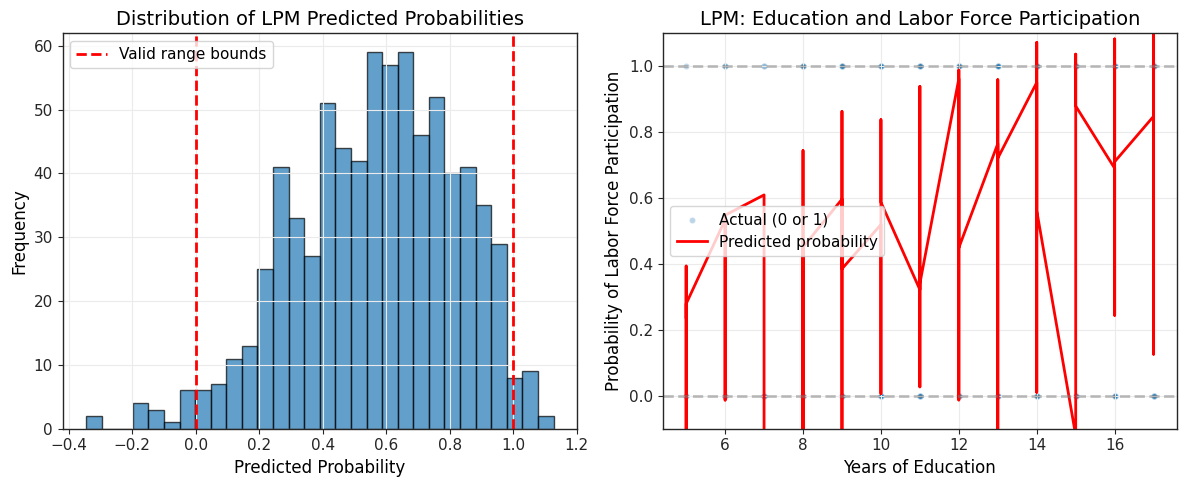
Range of predicted probabilities:
Minimum: -0.3451
Maximum: 1.1272
Proportion of predictions outside [0, 1]:
33 out of 753 (4.38%)
Key Limitations of the LPM:
Nonsensical predictions: Fitted values can fall outside the interval, which is problematic for probabilities
Heteroskedasticity: The error variance is inherently heteroskedastic: where is the true probability
Constant marginal effects: The LPM assumes the effect of on the probability is constant across all values of , which may be unrealistic
Linearity assumption: True relationship between covariates and probabilities may be nonlinear
When to use LPM:
Quick approximation and interpretation of effects
When most predicted probabilities fall within
For small to moderate effects where linearity is reasonable
As a benchmark to compare with nonlinear models (probit, logit)
Addressing heteroskedasticity:
Since LPM has heteroskedastic errors by construction, we should use heteroskedasticity-robust standard errors (covered in Chapter 8):
# Re-estimate with robust standard errors
results_lpm_robust = lpm.fit(cov_type="HC3")

# Compare standard errors
comparison = pd.DataFrame(
    {
        "Coefficient": round(results_lpm.params, 6),
        "SE (usual)": round(results_lpm.bse, 6),
        "SE (robust)": round(results_lpm_robust.bse, 6),
    },
)
print("\nComparison of Standard Errors:")
comparison
Comparison of Standard Errors:
Interpretation:
The robust standard errors account for heteroskedasticity and are generally larger than the usual OLS standard errors. When using LPM, always report robust standard errors for valid inference.
Connection to later chapters:
Chapter 8 discusses heteroskedasticity and robust standard errors in detail
Chapter 17 introduces probit and logit models, which constrain predicted probabilities to and allow for nonlinear probability responses
7.7 Policy Analysis and Program Evaluation
Dummy variables are essential tools for evaluating the effects of policy interventions and programs. When units (individuals, firms, regions) receive a treatment or participate in a program, we can use a treatment dummy to estimate the average treatment effect while controlling for observable characteristics.
7.7.1 Regression Adjustment for Treatment Effects
The basic program evaluation model is:
where:
if unit received the treatment (participated in program), 0 otherwise
is the average treatment effect (ATE) controlling for variables
variables are pre-treatment characteristics (covariates)
Interpretation:
measures the average difference in outcomes between treatment and control groups, holding all other covariates constant
This is called regression adjustment because we adjust for observable differences between treatment and control groups
If treatment is randomly assigned and variables are pre-treatment, has a causal interpretation
7.7.2 Example: Job Training Program Evaluation
Consider evaluating a job training program’s effect on earnings. We use hypothetical data similar to Wooldridge Example 7.9:
# Simulate job training data (similar structure to real evaluations)
np.random.seed(42)
n = 500

# Generate covariates (pre-treatment characteristics)
educ = np.random.randint(10, 17, n)  # Years of education (10-16)
age = np.random.randint(22, 55, n)  # Age (22-54)
prior_earn = np.random.gamma(3, 5, n)  # Prior earnings (in thousands)

# Treatment assignment (not fully random - selection bias)
# People with lower prior earnings more likely to participate
prob_treat = 0.3 + 0.2 * (prior_earn < prior_earn.mean())
treatment = np.random.binomial(1, prob_treat)

# Generate outcome (post-program earnings)
# True treatment effect is $3,000
earnings = (
    2
    + 1.5 * educ
    + 0.3 * age
    + 0.8 * prior_earn
    + 3 * treatment  # True ATE = 3 (thousands)
    + np.random.normal(0, 4, n)
)

# Create DataFrame
train_data = pd.DataFrame(
    {
        "earnings": earnings,
        "treatment": treatment,
        "educ": educ,
        "age": age,
        "prior_earn": prior_earn,
    },
)

print(f"Sample size: {n}")
print(f"Treatment group: {treatment.sum()} ({100*treatment.mean():.1f}%)")
print(f"Control group: {(1-treatment).sum()} ({100*(1-treatment).mean():.1f}%)")
Sample size: 500
Treatment group: 198 (39.6%)
Control group: 302 (60.4%)
Naive comparison (without regression adjustment):
# Simple mean difference (biased if groups differ in observables)
mean_treat = train_data[train_data["treatment"] == 1]["earnings"].mean()
mean_control = train_data[train_data["treatment"] == 0]["earnings"].mean()
naive_effect = mean_treat - mean_control

print(f"\nNaive Comparison (Simple Difference in Means):")
print(f"Average earnings (treatment group): ${mean_treat:.2f}k")
print(f"Average earnings (control group): ${mean_control:.2f}k")
print(f"Naive treatment effect: ${naive_effect:.2f}k")
Naive Comparison (Simple Difference in Means):
Average earnings (treatment group): $45.98k
Average earnings (control group): $45.82k
Naive treatment effect: $0.16k
This naive comparison may be biased if treatment and control groups differ in characteristics like education, age, or prior earnings.
Regression-adjusted estimate:
# Estimate with regression adjustment
eval_model = smf.ols(
    formula="earnings ~ treatment + educ + age + prior_earn",
    data=train_data,
)
results_eval = eval_model.fit()

# Display results
table_eval = pd.DataFrame(
    {
        "b": round(results_eval.params, 4),
        "se": round(results_eval.bse, 4),
        "t": round(results_eval.tvalues, 4),
        "pval": round(results_eval.pvalues, 4),
    },
)
print("\nRegression-Adjusted Treatment Effect:")
table_eval
Regression-Adjusted Treatment Effect:
Interpretation:
The coefficient on
treatmentis the regression-adjusted treatment effectThis controls for differences in education, age, and prior earnings between groups
The adjusted estimate should be closer to the true effect ($3,000) than the naive comparison
Standard error on
treatmentcoefficient allows us to test (no treatment effect)
7.7.3 Difference-in-Differences with Dummies
When we have data before and after program implementation, we can use difference-in-differences (DD) to control for time-invariant unobservables:
where:
for treatment group, 0 for control group
for post-treatment period, 0 for pre-treatment
is the interaction term (treatment effect)
is the DD estimator of the treatment effect
Intuition:
: Pre-existing difference between treatment and control groups
: Time trend affecting both groups
: Additional change in treatment group beyond time trend
# Simulate difference-in-differences data
np.random.seed(123)
n_units = 250  # Units per group
n_total = n_units * 2 * 2  # 2 groups * 2 time periods

# Create panel structure
unit_id = np.repeat(np.arange(n_units * 2), 2)
time = np.tile([0, 1], n_units * 2)  # 0 = before, 1 = after
treated = np.repeat([0, 1], n_units * 2)  # First 250 control, next 250 treated

# Interaction term
treat_after = treated * time

# Generate outcome with true DD effect of 5
# treated units have higher baseline (3)
# time trend is 2 for everyone
# treatment effect is 5
y_dd = (
    10
    + 3 * treated  # Pre-existing difference
    + 2 * time  # Time trend
    + 5 * treat_after  # Treatment effect
    + np.random.normal(0, 3, n_total)
)

dd_data = pd.DataFrame(
    {
        "y": y_dd,
        "treated": treated,
        "after": time,
        "treat_after": treat_after,
        "unit_id": unit_id,
    },
)

# Estimate DD model
dd_model = smf.ols(formula="y ~ treated + after + treat_after", data=dd_data)
results_dd = dd_model.fit()

# Display results
table_dd = pd.DataFrame(
    {
        "b": round(results_dd.params, 4),
        "se": round(results_dd.bse, 4),
        "t": round(results_dd.tvalues, 4),
        "pval": round(results_dd.pvalues, 4),
    },
)
print("\nDifference-in-Differences Estimation:")
table_dd
Difference-in-Differences Estimation:
Interpretation:
treated: Pre-treatment difference between groups (approximately 3)after: Common time trend (approximately 2)treat_after: DD estimate of treatment effect (approximately 5)The DD estimator controls for time-invariant differences between groups and common time trends
Key assumptions:
Parallel trends: Without treatment, both groups would have followed the same trend
No spillovers: Control group not affected by treatment group’s participation
Stable composition: Groups don’t change composition over time
7.8 Testing for Structural Breaks: The Chow Test
When we suspect that a regression relationship differs across groups or time periods, we can formally test for structural breaks using the Chow test. This F-test determines whether coefficients differ significantly between subsamples.
7.8.1 The Chow Test for Different Regression Functions
Suppose we have data from two groups (or time periods) and want to test whether the regression function is the same for both.
Pooled model (assumes same coefficients):
Separate models (allows different coefficients):
Chow test statistic:
where:
: Sum of squared residuals from pooled regression
: SSR from separate regressions for each group
: Number of restrictions (all coefficients equal)
: Total sample size
Under , the statistic follows .
7.8.2 Implementation using Interaction Terms
An equivalent way to conduct the Chow test is using an interaction model:
where for group 2, 0 for group 1.
Chow test as F-test:
If we reject , the regression functions differ significantly between groups.
7.8.3 Example: Testing for Gender Differences in Returns to Education
Let’s test whether the wage-education relationship differs by gender:
# Use wage1 data
wage1 = wool.data("wage1")

# Pooled model (assumes same coefficients for males and females)
pooled_model = smf.ols(
    formula="np.log(wage) ~ educ + exper + I(exper**2) + tenure + I(tenure**2)",
    data=wage1,
)
results_pooled = pooled_model.fit()

# Separate regressions
# Male model
male_model = smf.ols(
    formula="np.log(wage) ~ educ + exper + I(exper**2) + tenure + I(tenure**2)",
    data=wage1,
    subset=(wage1["female"] == 0),
)
results_male = male_model.fit()

# Female model
female_model = smf.ols(
    formula="np.log(wage) ~ educ + exper + I(exper**2) + tenure + I(tenure**2)",
    data=wage1,
    subset=(wage1["female"] == 1),
)
results_female = female_model.fit()

# Compute Chow test statistic
SSR_pooled = results_pooled.ssr
SSR_male = results_male.ssr
SSR_female = results_female.ssr
SSR_unrestricted = SSR_male + SSR_female

n = len(wage1)
k = 5  # Number of slope coefficients (excluding intercept)
df1 = k + 1  # Restrictions (all coefficients)
df2 = n - 2 * (k + 1)  # Unrestricted model df

chow_stat = ((SSR_pooled - SSR_unrestricted) / df1) / (SSR_unrestricted / df2)
chow_pval = 1 - stats.f.cdf(chow_stat, df1, df2)

print("\nChow Test for Structural Break (Gender Differences):")
print(f"SSR pooled: {SSR_pooled:.4f}")
print(f"SSR unrestricted (male + female): {SSR_unrestricted:.4f}")
print(f"Chow F-statistic: {chow_stat:.4f}")
print(f"Degrees of freedom: ({df1}, {df2})")
print(f"P-value: {chow_pval:.6f}")
print(
    f"Critical value (5% level): {stats.f.ppf(0.95, df1, df2):.4f}",
)

if chow_pval < 0.05:
    print("\nConclusion: REJECT null hypothesis - significant structural break")
    print("The wage-education relationship differs significantly by gender")
else:
    print("\nConclusion: FAIL TO REJECT null hypothesis")
    print("No evidence of structural break by gender")
Chow Test for Structural Break (Gender Differences):
SSR pooled: 93.9113
SSR unrestricted (male + female): 79.9204
Chow F-statistic: 14.9968
Degrees of freedom: (6, 514)
P-value: 0.000000
Critical value (5% level): 2.1162

Conclusion: REJECT null hypothesis - significant structural break
The wage-education relationship differs significantly by gender
Alternative: F-test on interaction model
# Full interaction model
interact_model = smf.ols(
    formula="np.log(wage) ~ female * (educ + exper + I(exper**2) + tenure + I(tenure**2))",
    data=wage1,
)
results_interact = interact_model.fit()

# Test all interaction terms jointly
# This tests H0: all interaction coefficients = 0
# Equivalent to Chow test
interaction_terms = [
    "female:educ",
    "female:exper",
    "female:I(exper ** 2)",
    "female:tenure",
    "female:I(tenure ** 2)",
    "female",  # Different intercept
]

# F-test for joint significance
f_test_result = results_interact.f_test(
    " + ".join([f"{term} = 0" for term in interaction_terms]),
)

print("\nF-test on Interaction Terms (Equivalent to Chow Test):")
print(f"F-statistic: {f_test_result.fvalue:.4f}")
print(f"P-value: {f_test_result.pvalue:.6f}")
print("\nNote: This F-statistic should match the Chow test statistic")
F-test on Interaction Terms (Equivalent to Chow Test):
F-statistic: 14.9968
P-value: 0.000000

Note: This F-statistic should match the Chow test statistic
7.8.4 Chow Test with Different Intercepts Only
Sometimes we want to test only if intercepts differ (not slopes). This is a restricted version:
This is simply a t-test on a single dummy variable:
# Model with only intercept difference (no slope interactions)
intercept_only = smf.ols(
    formula="np.log(wage) ~ female + educ + exper + I(exper**2) + tenure + I(tenure**2)",
    data=wage1,
)
results_intercept = intercept_only.fit()

# Extract female coefficient (intercept shift)
female_coef = results_intercept.params["female"]
female_se = results_intercept.bse["female"]
female_t = results_intercept.tvalues["female"]
female_p = results_intercept.pvalues["female"]

print("\nTest for Different Intercepts Only (Same Slopes):")
print(f"Female coefficient (intercept shift): {female_coef:.6f}")
print(f"Standard error: {female_se:.6f}")
print(f"t-statistic: {female_t:.4f}")
print(f"p-value: {female_p:.6f}")

if female_p < 0.05:
    print("\nConclusion: Intercepts differ significantly by gender")
    print("(but this doesn't test whether slopes also differ)")
Test for Different Intercepts Only (Same Slopes):
Female coefficient (intercept shift): -0.296511
Standard error: 0.035805
t-statistic: -8.2812
p-value: 0.000000

Conclusion: Intercepts differ significantly by gender
(but this doesn't test whether slopes also differ)
Interpretation:
The full Chow test (or F-test on all interactions) tests whether any coefficients differ
The intercept-only test is more restrictive and asks only whether the baseline wage differs
If the full Chow test rejects but the intercept-only test doesn’t, this suggests slopes differ even if intercepts don’t
Key insight:
The Chow test is essentially the same as testing the joint significance of all interaction terms in a fully interacted model. The interaction approach is more flexible because you can:
Test for different intercepts only (one dummy)
Test for different slopes only (slope interactions)
Test for any differences (all interactions including intercept)
This provides a comprehensive framework for testing structural stability across groups or time periods.
Chapter Summary
Chapter 7 introduced qualitative (categorical) regressors into the multiple regression framework, expanding our ability to model economic relationships and evaluate policies.
Key Concepts
Dummy Variables:
Binary variables taking values 0 or 1 to represent categories
Interpretation: is the average difference between groups, holding other variables constant
In log models: Percentage difference (exact: )
Always exclude one category (reference group) to avoid perfect multicollinearity
Multiple Categories:
Use dummies for categories
Coefficients measure differences relative to the omitted reference group
F-tests can test overall significance of categorical variables
ANOVA tables decompose variation within and between groups
Interactions:
Dummy-continuous: Allow slope of continuous variable to differ across groups
For group : slope is
For group : slope is
Dummy-dummy: Allow effect of one dummy to vary across another dummy
Interaction coefficient is the additional effect when both dummies are 1
Full interactions: Allow complete regression functions (intercepts and all slopes) to differ across groups
Linear Probability Model (LPM):
OLS regression with binary (0/1) dependent variable
Fitted values are estimated probabilities:
Coefficients represent marginal effects on probabilities (in percentage points)
Limitations: Predictions outside , heteroskedastic errors, constant marginal effects
Always use robust standard errors with LPM
Alternative models: Probit and logit (Chapter 17)
Policy Evaluation:
Regression adjustment: Control for observable differences using covariates
Treatment effect from:
Difference-in-differences: Control for time-invariant unobservables
DD estimator from:
Requires parallel trends assumption
Chow Test:
Formal test for structural breaks (parameter stability across groups/time)
Tests : All coefficients equal across groups
Implementation: Compare pooled vs separate regressions, or F-test on interactions
Flexible: Can test different intercepts only, different slopes only, or all differences
Python Implementation Patterns
Creating dummy variables:
Automatic with categorical in formula:
y ~ C(region) + x1 + x2Manual creation:
data["female"] = (data["sex"] == "F").astype(int)Multiple categories:
pd.get_dummies(data["occupation"], drop_first=True, prefix="occ")
Interactions in formulas:
Dummy-continuous:
y ~ female * educexpands tofemale + educ + female:educFull interaction:
y ~ female * (educ + exper + tenure)includes all interactions
Testing with F-tests:
Joint significance:
results.f_test("C(region)[T.midwest] = 0, C(region)[T.south] = 0")Chow test:
results.f_test("female = 0, female:educ = 0, female:exper = 0")
Robust standard errors:
For LPM and heteroskedasticity:
model.fit(cov_type="HC3")
Common Pitfalls
Dummy variable trap: Including all categories plus intercept causes perfect multicollinearity. Always exclude one reference group.
Misinterpreting log models: In , the coefficient is NOT the percentage difference. Use for exact percentage.
Ignoring heteroskedasticity in LPM: LPM has heteroskedastic errors by construction. Always use robust standard errors.
Extrapolating LPM: Predictions outside are nonsensical. LPM works best when most fitted values are in .
Confusing treatment assignment with treatment effect: Selection bias occurs when treatment group differs from control group in unobservables. Regression adjustment only controls for observables.
Forgetting interaction interpretation: When and interact, the marginal effect of depends on the value of (and vice versa).
Connections
To previous chapters:
Chapter 3: Dummy variables extend multiple regression to qualitative data
Chapter 4: Same inference tools (t-tests, F-tests) apply to dummy coefficients
Chapter 6: Interaction terms as generalization of functional form flexibility
To later chapters:
Chapter 8: Heteroskedasticity-robust inference critical for LPM
Chapter 13-14: Panel data methods extend difference-in-differences
Chapter 15: Instrumental variables for endogenous treatment assignment
Chapter 17: Probit and logit models for binary outcomes (nonlinear alternatives to LPM)
Practical Guidance
When to use dummy variables:
Modeling discrete categories (gender, region, industry)
Capturing seasonal or time effects
Policy evaluation (treatment/control comparisons)
Testing parameter stability (Chow test framework)
Choosing reference group:
Pick largest or most natural comparison group
Be explicit about omitted category in interpretation
Results are invariant to choice (same F-tests), but interpretation changes
Interaction modeling strategy:
Start simple: Test dummy main effect only
If theoretically motivated, add interactions
Test joint significance of interactions (F-test)
If interactions significant, interpret using predicted values or marginal effects at different values
Program evaluation best practices:
Check balance of covariates across treatment/control groups
Use robust standard errors
If treatment not random, consider IV methods (Chapter 15) or panel methods (Chapters 13-14)
Report both naive (unadjusted) and regression-adjusted estimates for transparency
Reporting results:
Clearly state reference group for categorical variables
For interactions, show predicted effects at meaningful values of moderating variables
Use visualization (predicted values plots) to clarify interaction effects
For LPM, always note predictions outside and use robust SEs
Learning Objectives Covered
7.1: Define dummy variables and provide examples
7.2: Interpret dummy variable coefficients in various functional forms
7.3: Understand interactions among dummy variables
7.4: Interpret interactions between dummy and continuous variables
7.5: Incorporate multiple categorical variables using multiple dummies
7.6: Understand purpose of Chow test for parameter stability
7.7: Implement Chow test with different intercepts (restricted version)
7.8: Define and interpret linear probability model for binary outcomes
7.9: Use regression adjustment for program evaluation
7.10: Interpret regression results with discrete dependent variables
This chapter provided the tools to handle qualitative information in regression analysis, enabling richer modeling of economic relationships and rigorous evaluation of policies and programs.